Android 14 is the release that made apps say why they run. Every foreground service in an app targeting API 34 needs a declared type and a matching permission, and users can hand an app a few photos instead of the whole library. On every device, apps that target an API level below 23 can no longer be installed.
At a glance
| Version | Android 14 |
| API level | 34 |
| Name | Upside Down Cake, internal; visible in the SDK constant. Public name: Android 14 |
Build.VERSION_CODES | UPSIDE_DOWN_CAKE |
| Release | Pixel rollout began 4 October 2023 |
| Launch devices | Pixel 8 and Pixel 8 Pro, announced 4 October 2023, on sale from 12 October |
| Google Play target-API deadline | New apps and app updates from 31 August 2024 (extension to 1 November 2024) |
Google announced Android 14 with Developer Preview 1 on 8 February 2023. Beta 1 opened the Android Beta program on 12 April, and Beta 3 reached platform stability on 7 June, with the APIs and app-facing behaviours final. The two developer previews and the five betas are the parts that follow this overview.
Google released Android 14 and pushed its source to AOSP on 4 October 2023.
The first Pixel build (UP1A.231005.007) covered the Pixel 4a (5G) through
the Pixel Fold and Pixel Tablet. Google’s post named Samsung, iQOO, Nothing,
OnePlus, Oppo, Realme, Sharp, Sony, Tecno, vivo and Xiaomi for later in the
year. Pixel 8 and 8 Pro were announced the same day, and AOSP lists Android 14
builds made for them.
Google kept the dessert name inside the code. A change posted to AOSP in April
2022 named the release Upside Down Cake, and Build.java defines
UPSIDE_DOWN_CAKE = 34 with the comment “Upside Down Cake.”. Build IDs start
with U. Google’s announcements only ever say Android 14.
What it brought
- Lock screen. A rebuilt customization picker, lock screen templates for clocks, widgets and colors, custom lock screen shortcuts, and a monochromatic theme. Generative AI wallpapers came first to the Pixel 8.
- Accessibility. Font size goes up to 200%, on a non-linear curve so large text grows more slowly than small text. Google’s launch post says the Pixel maximum was 130% before. Users also got “Flash notifications” and a hearing-aid setup flow.
- Ultra HDR. 10-bit HDR photos in a format that stays readable as a normal JPEG. An app opts in to HDR display per window.
- Health Connect in the platform. The health data store moves from a Play Store app into the system, updated through Google Play system updates, and sits in Settings. It added exercise routes, and another app can read a route only after the user allows that route.
- Credential Manager. One platform API (
android.credentials) for passwords, passkeys and federated sign-in. The Jetpack library brings it back to Android 4.4 through Google Play services. - Regional preferences. Users pick temperature units, the first day of the
week and the numbering system in “Regional preferences”. Apps read them with
calls such as
getTemperatureUnit()andgetFirstDayOfWeek(). - Languages. The Grammatical Inflection API addresses the user in their
grammatical gender. Per-app languages gained
setOverrideLocaleConfig(), and AGP 8.1 generates theLocaleConfigfile. - Screenshot detection. An activity registers an
Activity.ScreenCaptureCallbackand learns that a screenshot was taken while it was visible. The app never gets the image, and the system tells the user the app noticed. - Predictive back. Cross-activity and cross-task animations join the back-to-home animation from Android 13, with new callbacks for in-app transitions. The system animations stayed behind a developer option.
- Developer APIs. Custom sharesheet actions,
PathIteratorandPath.interpolate(), custom meshes with AGSL shaders,HardwareBufferRenderer, lossless USB audio, and about 300java.baseclasses updated to OpenJDK 17. - App stores. Installers can ask for approval before downloading, claim
update ownership with
setRequestUpdateOwnership(), and wait until the app is not in use to update it.
The launch post also reported performance numbers from the beta population. Cached processes used up to 50% fewer CPU cycles than on Android 13, cold app starts fell 20% on 8 GB devices and over 30% on 12 GB devices, and ART code size shrank by 9.3% on average.
Security and privacy
On every Android 14 device:
- Minimum installable target. An app with
targetSdkVersionbelow 23 fails to install withINSTALL_FAILED_DEPRECATED_SDK_VERSION. Google said malware targets 22 to dodge the runtime permissions of Android 6.0. Apps already installed before the upgrade stay, andadb install --bypass-low-target-sdk-blockinstalls one for testing. - Accessibility services. A view can call
setAccessibilityDataSensitive()so only services that declareisAccessibilityToolcan read it or act on it. Malware often abuses accessibility services. - Media owners.
MediaStoreredactsOWNER_PACKAGE_NAME, unless the owner app is always visible or the caller holdsQUERY_ALL_PACKAGES. - PIN. Android 14 encourages a six-digit PIN and unlocks without “Enter” once a correct six-digit or longer PIN is typed.
- Cellular. IT admins can stop managed devices from falling back to 2G, and a new toggle, where the manufacturer enables it, rejects null-ciphered connections so voice and SMS stay encrypted.
- Platform. AES-HCTR2 is the preferred filename encryption on devices with crypto instructions, and key attestation supports two IMEIs.
For apps that target API 34:
- Implicit intents reach only exported components. A mutable
PendingIntentbuilt from an intent with no component or package throws an exception. - Runtime receivers must pass
RECEIVER_EXPORTEDorRECEIVER_NOT_EXPORTEDtoregisterReceiver(), except for receivers of system broadcasts only. - Dynamic code loading. Every DEX, JAR or APK an app loads at runtime must be read-only, or the system throws.
- Zip path traversal.
ZipFile(String)andZipInputStream.getNextEntry()throw aZipExceptionfor entry names that contain..or start with/. - Background activity starts. A
PendingIntentsender or an app binding a service must opt in to share its right to start activities from the background. - Screen capture. Each
MediaProjectionsession needs fresh user consent; a cached consent intent or a secondcreateVirtualDisplay()call throws.
Permissions
- Selected photos and videos. When an app targeting API 34 asks for
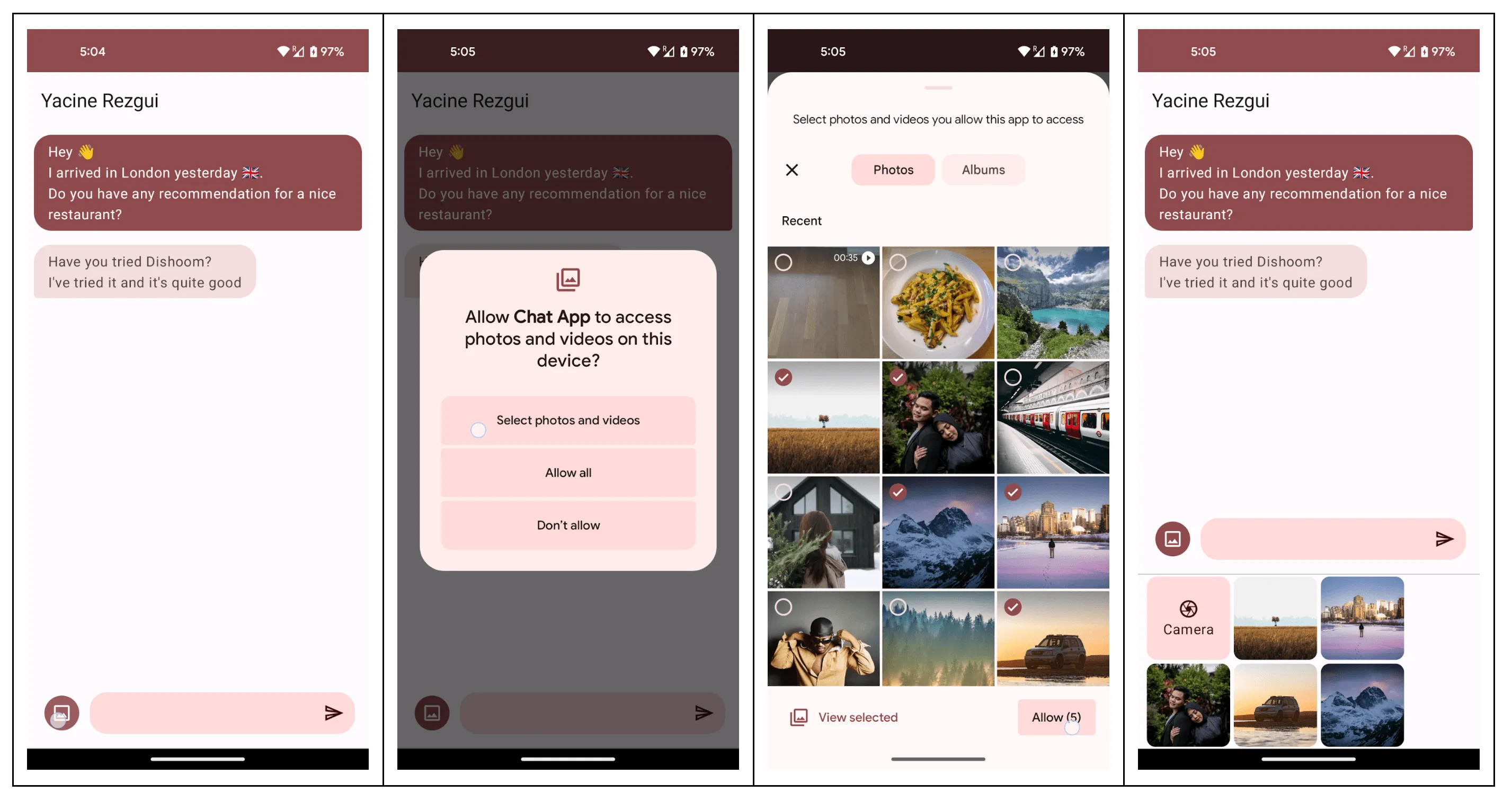
READ_MEDIA_IMAGESorREAD_MEDIA_VIDEO, the dialog offers “Select photos and videos”, “Allow all” and “Don’t allow”. The newREAD_MEDIA_VISUAL_USER_SELECTEDpermission reports partial access and lets the app reopen the picker. An app that does not declare it runs in a compatibility mode the system controls. The media permissions themselves began in Android 13. - Foreground service permissions. Each foreground service type has its own
permission, such as
FOREGROUND_SERVICE_CAMERA. They are normal permissions, granted at install; the user cannot revoke them. - Exact alarms.
SCHEDULE_EXACT_ALARMis no longer pre-granted to most new installs of apps targeting API 33 or higher. The user turns on “Alarms & reminders” in Settings. Calendar and alarm clock apps can useUSE_EXACT_ALARM, which Play allows only for them. Apps that held the permission before the upgrade keep it. - Full-screen intents. For apps targeting API 34,
USE_FULL_SCREEN_INTENTis meant only for calling and alarm apps, and Google Play revokes it from other apps from 31 May 2024.canUseFullScreenIntent()checks it, andACTION_MANAGE_APP_USE_FULL_SCREEN_INTENTopens its settings page. - Data sharing in the location dialog. If an app declared in Play’s Data safety form that it shares location with third parties, the location dialog shows that. If an app starts sharing location with third parties or for ads, the user gets a notification within 30 days.
- Screenshot detection needs
DETECT_SCREEN_CAPTURE, an install-time permission.
What changed for your app
All apps on Android 14
| Change | What to do |
|---|---|
| Apps targeting below 23 cannot be installed | Raise targetSdkVersion to at least 23 |
SCHEDULE_EXACT_ALARM denied by default on new installs (target 33+) | Call canScheduleExactAlarms() first; use inexact alarms or WorkManager when you can |
| Cached apps are frozen shortly after leaving the screen | Run background work through services, JobScheduler or WorkManager |
| Context-registered broadcasts are queued while the app is cached | Do not expect them on time; some, such as BATTERY_CHANGED, may be merged |
killBackgroundProcesses() only kills your own processes | Stop trying to manage other apps’ processes |
Ongoing (setOngoing(true)) notifications can be dismissed | Keep state in the app, not in the notification; call, media and lock-screen cases are exempt |
| Font scale up to 200%, non-linear | Use sp for text and lineHeight; convert with TypedValue.applyDimension() |
mlock() limited to 64 KB per process (was 64 MB) | Check native code that locks memory |
| First GATT client’s MTU request asks for 517 bytes; later requests ignored | Make the peripheral answer the MTU request with a size it supports |
Apps targeting API 34
The security changes for this target are listed in Security and privacy.
| Change | What to do |
|---|---|
Every foreground service needs android:foregroundServiceType | Declare the type, its FOREGROUND_SERVICE_* permission, and pass the type to startForeground() |
| Partial access to photos and videos | Use the photo picker, or declare READ_MEDIA_VISUAL_USER_SELECTED and handle partial access |
JobScheduler ANRs when onStartJob or onStopJob blocks | Move work off the main thread, or use WorkManager |
Network constraints in JobScheduler need ACCESS_NETWORK_STATE | Declare it, or scheduling throws a SecurityException |
BluetoothAdapter.getProfileConnectionState() enforces BLUETOOTH_CONNECT | Declare and request it before the call |
TileService.startActivityAndCollapse(Intent) throws | Pass a PendingIntent instead |
Stricter regular expressions and UUID.fromString() (OpenJDK 17) | Test parsing code; both now throw IllegalArgumentException on bad input |
The foreground service rule is the one most apps hit. A missing type throws
MissingForegroundServiceTypeException; a missing type permission or runtime
prerequisite throws SecurityException.
Android 14 adds five types: health, remoteMessaging, shortService,
specialUse and systemExempted. A shortService runs for about 3 minutes
and needs no extra permission. A specialUse service explains its use case in
a manifest <property>, and Google Play reviews it. Google recommends
WorkManager or user-initiated data transfer jobs for work that fits no type.
What lasted
- Minimum installable target kept rising: Android 15 blocks apps that target below 24.
- Foreground service types stayed mandatory. Android 15 added a
mediaProcessingtype and limitsdataSyncservices to 6 hours in 24. - Predictive back left the developer option in Android 15. System animations now play for every app that opted in.
- Selected photo access and
READ_MEDIA_VISUAL_USER_SELECTEDare still how a gallery app gets partial access. - Health Connect and Credential Manager remain platform APIs.
- USB webcam. Android 14 enabled the UVC gadget driver in the Generic Kernel Image by default; using the device as a USB webcam came with the Android 14 QPR1 update, not the first release.
Worth knowing
- The Easter egg is a spaceflight game. Tap “Android version” in Settings three
times, then long-press the logo. You steer a ship by dragging; the screen
shows thrust, position and velocity, and
LND:with the planet’s name when you land. - Each game starts in a random star system with 1 to 10 planets, each named after the system plus a number.
- The starfield on the logo screen draws 34 stars. The constant reads
NUM_STARS = 34; // Build.VERSION_CODES.UPSIDE_DOWN_CAKE. - Its top speed is
MAX_WARP = 10f, with the comment “after all these years”.
Android 14 Developer Preview 1: typed services
8 February 2023. The first Android 14 build, for developers only, required foreground service types, blocked installs below target 23 and denied exact alarms by default.
Read on its own: Android 14 Developer Preview 1: typed servicesGoogle released the first developer preview of Android 14 on 8 February 2023, eight months before the Pixel rollout. Dave Burke’s post called it “just the beginning”, and the Android Beta program was not open for it.
| Release date | 8 February 2023 |
| Build | UPP1.230113.009 |
| Security patch | February 2023 |
| Devices | Pixel 4a (5G), 5, 5a 5G, 6, 6 Pro, 6a, 7 and 7 Pro; 64-bit Android Emulator images |
| How to get it | Flash a system image by hand; later previews and betas then arrived over the air |
| Platform stability | No; Google expected it in June 2023 |
Most of what defines targeting API 34 was already here. Foreground services
had to declare a type, and a new user-initiated data transfer job took over
large downloads and uploads. Context-registered broadcasts were queued while an
app was cached. Newly installed apps targeting 33 or higher lost the
pre-granted SCHEDULE_EXACT_ALARM; clock and calendar apps could declare
USE_EXACT_ALARM instead.
Apps with a targetSdkVersion below 23 could no longer be installed, and
adb install --bypass-low-target-sdk-block existed for testing from day one.
Runtime receivers had to say whether they were exported, implicit intents
stopped reaching internal components, and dynamically loaded code had to be
read-only.
The build also brought fonts up to 200% on a non-linear curve,
LocaleManager.setOverrideLocaleConfig(), the Grammatical Inflection API and
about 300 OpenJDK 17 classes. Most behaviour changes could be toggled one by
one from Developer options or adb.
Android 14 Developer Preview 2: selected photos
8 March 2023. The second preview let users share only selected photos and videos, made Credential Manager a platform API and froze cached apps faster than Android 13.
Read on its own: Android 14 Developer Preview 2: selected photosDeveloper Preview 2 came out on 8 March 2023, still by manual download for new testers and over the air for anyone on Preview 1. It was the last build before the betas.
| Release date | 8 March 2023 |
| Build | UPP2.230217.004 |
| Security patch | March 2023 |
| Devices | The same Pixel phones as Preview 1; 64-bit Android Emulator images |
| How to get it | Flash by hand, or over the air from Preview 1 |
| Platform stability | No |
The headline change was selected photos access. When an app asks for
READ_MEDIA_IMAGES or READ_MEDIA_VIDEO, the user can grant only the items
they pick, and READ_MEDIA_VISUAL_USER_SELECTED lets the app ask again.
Credential Manager became a platform API, with a Jetpack library back to
Android 4.4.
For apps targeting the new platform, a mutable PendingIntent built from an
implicit intent now throws, and apps must opt in to share their right to start
activities from the background. On every app, background work stopped a few
seconds after the app was cached, which Google called “an order of magnitude
faster than on Android 13”. FLAG_ONGOING_EVENT notifications became
dismissible on unlocked phones.
The release notes add screenshot detection, regional preferences such as
getTemperatureUnit(), killBackgroundProcesses() limited to the app’s own
processes, and redacted media owner names. App stores got
requestUserPreapproval(), setRequestUpdateOwnership(),
setDontKillApp() and the InstallConstraints API.
Android 14 Beta 1: open to early adopters
12 April 2023. The first beta opened the Android Beta program, and added sharesheet custom actions, queryable paths and the accessibilityDataSensitive attribute.
Read on its own: Android 14 Beta 1: open to early adoptersBeta 1 came out on 12 April 2023 and opened Android 14 to early adopters through the Android Beta program. Pixel owners already in the Android 13 QPR beta got it without doing anything.
| Release date | 12 April 2023; Beta 1.1 on 26 April 2023 |
| Build | UPB1.230309.014; 1.1 UPB1.230309.017 (.A1 for Pixel 6, 6 Pro and 6a on Verizon) |
| Security patch | April 2023 (March 2023 for Pixel 6 phones on Verizon) |
| Devices | Pixel 4a (5G) to Pixel 7 Pro; 64-bit Android Emulator images |
| How to get it | Over the air through Android Beta, or by flashing |
| Platform stability | No |
Apps can add their own actions to the system sharesheet with
ChooserAction.Builder and Intent.EXTRA_CHOOSER_CUSTOM_ACTIONS, and direct
share ranking reads usage reported through pushDynamicShortcut(). Path
became queryable and interpolatable, with an AndroidX library back to API 21.
The accessibilityDataSensitive attribute hides a view from accessibility
services that do not claim to help users with disabilities.
Gesture navigation got a larger back arrow that follows the wallpaper colors.
Android Studio Giraffe Canary 7 with AGP 8.1.0-alpha07 started generating the
LocaleConfig file for per-app languages.
Beta 1.1 fixed a System UI crash in “Wallpaper & style”, fingerprint unlock, a missing mobile network icon and SIM or eSIM detection.
Android 14 Beta 2: partner phones, Ultra HDR
10 May 2023, at Google I/O. The second beta reached partner phones and added Ultra HDR, camera extension upgrades, Health Connect in the platform and limits on full-screen intents.
Read on its own: Android 14 Beta 2: partner phones, Ultra HDRBeta 2 came out on 10 May 2023, the day of Google I/O, and was the first Android 14 build for phones outside the Pixel line.
| Release date | 10 May 2023; Beta 2.1 on 25 May 2023 |
| Build | UPB2.230407.014; 2.1 UPB2.230407.019 |
| Security patch | May 2023 |
| Devices | Pixel 4a (5G) to Pixel 7 Pro; phones, tablets and foldables from iQOO, Lenovo, Nothing, OnePlus, OPPO, Realme, Tecno, vivo and Xiaomi |
| How to get it | Over the air through Android Beta, or by flashing |
| Platform stability | No; Google still expected it in June |
Ultra HDR arrived: 10-bit photos that stay readable as JPEG, shown in HDR when
the window opts in with Window.setColorMode(). Camera extensions gained
latency estimates through getRealtimeStillCaptureLatency(), progress
callbacks, a postview image and EXTENSION_STRENGTH. The build also added
in-sensor zoom with a cropped RAW stream, lossless USB audio through
AudioMixerAttributes, custom meshes with AGSL shaders and
HardwareBufferRenderer.
Health Connect moved into the platform, with exercise routes. The location
dialog started showing data shared with third parties, from the Play Data
safety form. USE_FULL_SCREEN_INTENT was limited to calling and alarm apps,
with canUseFullScreenIntent() to check it.
Predictive back could be enabled per activity, and
overrideActivityTransition() replaced overridePendingTransition() for
transitions that follow the swipe. The system animations stayed behind a
developer option.
Beta 2.1 fixed device setup after leaving the beta, a battery level stuck at 0% and speaker audio disruptions.
Android 14 Beta 3: platform stability
7 June 2023. The third beta reached platform stability, so SDK and NDK APIs and app-facing behaviours were final, and the Pixel 7a joined the beta.
Read on its own: Android 14 Beta 3: platform stabilityBeta 3 came out on 7 June 2023 and reached platform stability: the developer APIs and all app-facing behaviours were final. Google asked developers to start final compatibility testing, and SDK, library and game engine developers to ship first.
| Release date | 7 June 2023; Beta 3.1 on 14 June 2023 |
| Build | UPB3.230519.008; 3.1 UPB3.230519.014 |
| Security patch | May 2023; 3.1 June 2023 |
| Devices | Pixel 4a (5G) to Pixel 7 Pro, plus the new Pixel 7a; emulator |
| How to get it | Over the air through Android Beta, or by flashing |
| Platform stability | Yes |
The post listed what to test. For all apps: font scaling to 200%, partial
photo access, which the system treats as a one-time permission once the app
goes to the background, and the data safety section in permission dialogs. For
apps targeting 34: foreground service types, OpenJDK 17 changes to regular
expressions and UUID handling, and the security changes such as the zip path
traversal check.
The foreground service list took its final shape here. health and
remoteMessaging were new types, and shortService, specialUse and
systemExempted were reserved for their cases.
Beta 3.1 fixed fingerprint unlock on some devices and crashes in apps that use mapping SDKs.
Android 14 Beta 4: Pixel Tablet and Fold
11 July 2023. The fourth beta, the second with platform stability, reached the Pixel Tablet and Pixel Fold and let apps targeting API 34 ship on Google Play.
Read on its own: Android 14 Beta 4: Pixel Tablet and FoldBeta 4 came out on 11 July 2023, the second build with platform stability. Google said developers could now publish apps on Google Play for devices running Android 14 at the official API level.
| Release date | 11 July 2023; Beta 4.1 on 26 July 2023 |
| Build | UPB4.230623.005; 4.1 UPB4.230623.007 |
| Security patch | July 2023 |
| Devices | Pixel 4a (5G) to Pixel 7a, plus the Pixel Tablet and Pixel Fold |
| How to get it | Over the air through Android Beta, or by flashing |
| Platform stability | Yes |
The post added no features. It brought the beta to Google’s tablet and foldable, and pointed to the Android SDK Upgrade Assistant in Android Studio Hedgehog, which lists the Android 14 changes that apply to an app.
Beta 4.1 fixed apps that could not relaunch after closing them with back until
a restart, a stuck ScrollView overscroll after a fling, Wi-Fi calling, and
the icon handed over by SplashScreen.setOnExitAnimationListener().
Android 14 Beta 5: the last scheduled beta
10 August 2023. The last scheduled beta, the third with platform stability, followed by three bug-fix updates before the stable release on 4 October.
Read on its own: Android 14 Beta 5: the last scheduled betaBeta 5 came out on 10 August 2023, the last scheduled beta and the third build with platform stability. Apps targeting SDK 34 could ship on Google Play.
| Release date | 10 August 2023; 5.1 on 18 August, 5.2 on 25 August, 5.3 on 6 September 2023 |
| Build | UPB5.230623.003; 5.1 .005, 5.2 .006 (.A1 on Tablet and Fold), 5.3 .009 |
| Security patch | August 2023 |
| Devices | Pixel 4a (5G) to Pixel 7a, Pixel Tablet and Pixel Fold |
| How to get it | Over the air through Android Beta, or by flashing |
| Platform stability | Yes |
The post repeated the changes to test first: partial photo access, full-screen
intents limited to calling and alarm apps, SCHEDULE_EXACT_ALARM denied by
default, and font scaling to 200%. Google said emulator images would
follow soon.
The final release took almost two months more, so Beta 5 got three fix
updates. 5.1 fixed SIM detection with Fixed Dialing Numbers enabled and 5G
standalone drops. 5.2 fixed reboot stalls and fingerprint problems on the
Tablet and Fold. 5.3 fixed crashes after a CallStyle notification and a
slow path for background CPU limits. Android 14 shipped on
4 October 2023.

