Android 13 is the release where an app had to ask before it could send a notification. It also split the storage permission into images, video and audio, and shipped a photo picker that needs no permission. For developers the rest was a short list: per-app languages, themed icons, and stricter intent delivery.
At a glance
| Version | Android 13 |
| API level | 33 |
| Name | Tiramisu, internal, but visible in the SDK constant |
Build.VERSION_CODES | TIRAMISU |
| Release | Source in AOSP and Pixel rollout from 15 August 2022 |
| Launch devices | Pixel 7 and Pixel 7 Pro, announced 6 October 2022 |
| Google Play target-API deadline | New apps and app updates from 31 August 2023 (extensions to 1 Nov) |
Google pushed Android 13 to AOSP and began the Pixel rollout on 15 August 2022. Its announcement named Samsung, Asus, HMD, Motorola, OnePlus, OPPO, Sony, Xiaomi and others for later that year. Google’s first phones sold with it were the Pixel 7 and Pixel 7 Pro, announced on 6 October and in US stores from 13 October.
The public name is just Android 13. Tiramisu is the internal dessert name, and
from this release it is no longer hidden: the constant is TIRAMISU, not a
single letter, and Android Studio’s SDK Manager lists the platform as
“Android 13.0 (“Tiramisu”)”. Build IDs start with T (TP1A).
Google announced Android 13 with Developer Preview 1 on 10 February 2022. Beta 1 followed on 26 April, and Beta 3 reached platform stability on 8 June, freezing the API 33 SDK and app-facing behaviour. The two developer previews and four betas are the parts below this overview.
What it brought
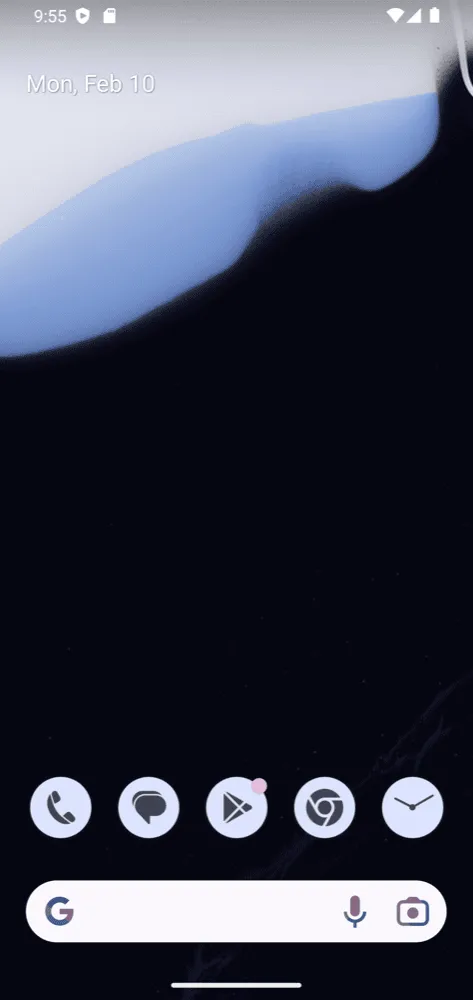
- Per-app languages. Users pick a language per app in “App languages”,
while the system stays in another. An app declares
android:localeConfigto appear there and can set the language itself withLocaleManager.setApplicationLocales(). AppCompat 1.6 backports the API. - Themed app icons. An app that adds a monochrome layer to its adaptive icon gets tinted to match the wallpaper, when the user turns on “Themed icons” and the launcher supports it. Ars Technica noted that the feature was still in beta at launch.
- Clipboard preview. Copying shows a small confirmation with a preview of the content, like a screenshot thumbnail; tapping it opens an editor.
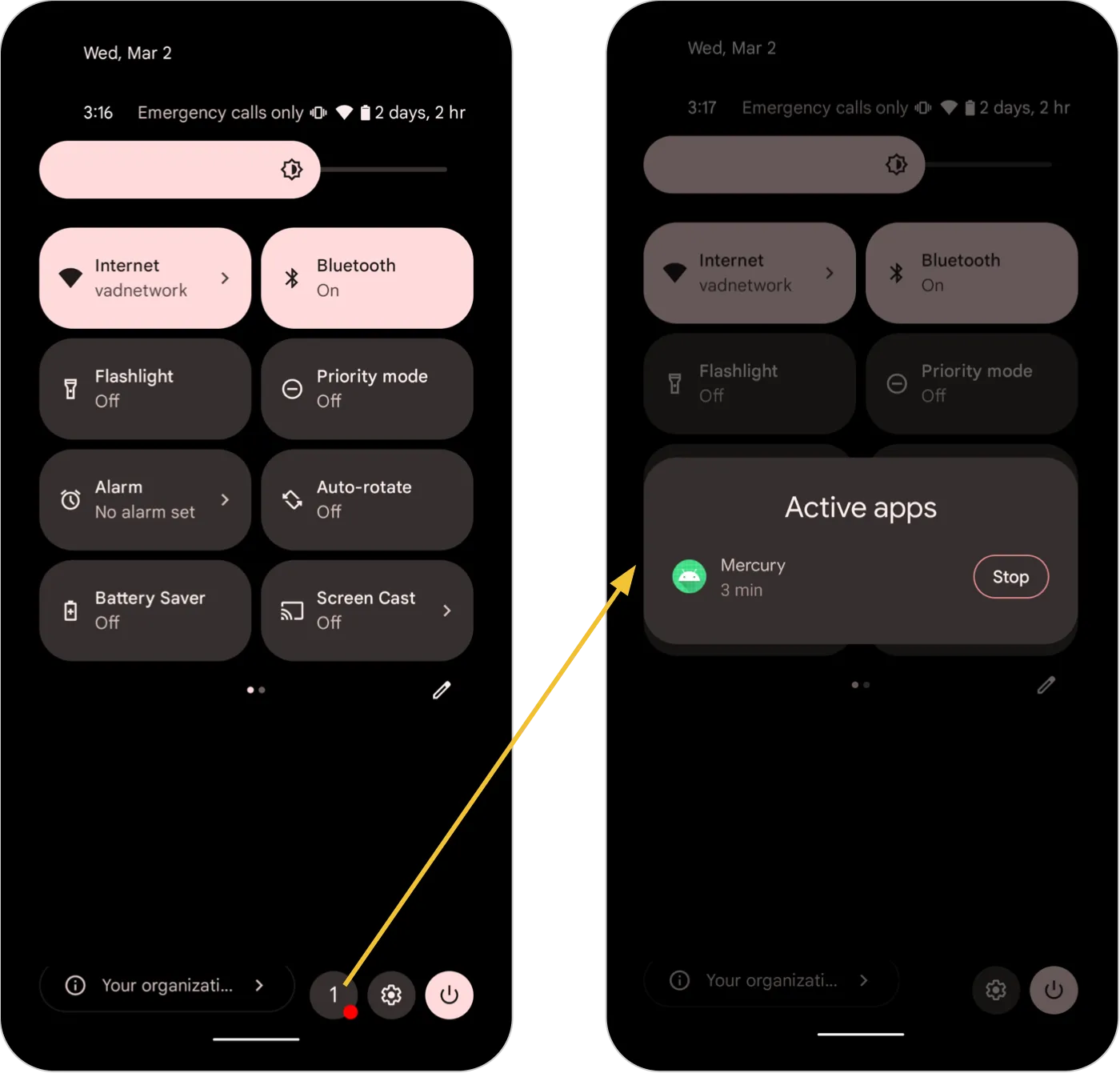
- Foreground Services Task Manager. The bottom of Quick Settings shows how many apps run a foreground service, with a “Stop” button for each.
- Quick Settings placement API. An app can ask the user, in one system dialog, to add its custom tile.
- Media controls. For apps targeting 33, the system builds the media player
buttons from
PlaybackStateactions instead of the notification’s action list. - Audio. Built-in Bluetooth LE Audio on compatible devices, MIDI 2.0 over
USB, spatial audio with head tracking, and
AudioManagerAPIs that tell an app how its audio will be routed. - Graphics and text.
RuntimeShaderwith AGSL, COLRv1 vector emoji, up to 200% faster hyphenation, better line heights for non-Latin scripts, and phrase-based Japanese line breaks. - Runtime. JNI calls up to 2.5x faster, mostly non-blocking reference
processing, and a first set of OpenJDK 11 library APIs (
String.strip(),Optional.isEmpty()and more), also sent to Android 12 through the ART module. A garbage collector built on the kernel’suserfaultfdwas not in the release: Google said it would reach Android 13 devices in a later Google Play system update. - Wi-Fi 7.
ScanResult.WIFI_STANDARD_11BE, new in API 33, lets an app tell 802.11be access points apart in scan results. Whether a phone connects over Wi-Fi 7 depends on its hardware. - Predictive back. New APIs let an app say ahead of time that it handles back, so the system can preview the destination. In Android 13 the animation is only behind a developer option.
- Tablets. It builds on Android 12L: a taskbar with an app drawer, and multi-window enabled for all apps on large screens.
Security and privacy
- Photo picker. A system screen where the user picks specific photos or videos, and only those reach the app. The app declares no permission. The same picker reached Android 11 and 12 through a Google Play system update.
- Clipboard auto-clear. The clipboard is wiped a while after the last
copy. In AOSP the default is
3600000ms, one hour, adjustable by the device throughDeviceConfig. Apps that copy passwords should setClipDescription.EXTRA_IS_SENSITIVEso the preview hides the content. - Restricted settings. An app installed from a local or downloaded file
cannot be granted accessibility or notification listener access until the
user opens its App info page and picks “Allow restricted settings”. AOSP
sets this on installs whose source is
PACKAGE_SOURCE_LOCAL_FILEorPACKAGE_SOURCE_DOWNLOADED_FILE, so installs made by an app store are not flagged. - Intent matching. An exported component of an app targeting 33 only
receives intents from other apps that match one of its
<intent-filter>elements. See below for what to change. - Exported receivers.
registerReceiver()takesRECEIVER_EXPORTEDorRECEIVER_NOT_EXPORTED, so a runtime receiver no longer has to be open to every app. - Platform. Device log access needs the user’s approval on each request. The Android Virtualization Framework (pKVM) arrives as an optional feature for isolated workloads. APK Signature Scheme v3.1 lets key rotation target Android 13 and later only. Keystore and KeyMint report errors as typed exceptions that say whether a retry can help. Bluetooth and Ultra-wideband became Mainline modules, so Google can update them through Google Play system updates.
Permissions
New runtime permissions in Android 13:
| Permission | Replaces or extends | Granted by |
|---|---|---|
POST_NOTIFICATIONS | Notifications were on by default | Runtime dialog |
READ_MEDIA_IMAGES, READ_MEDIA_VIDEO, READ_MEDIA_AUDIO | READ_EXTERNAL_STORAGE for other apps’ media | Runtime dialog |
NEARBY_WIFI_DEVICES | ACCESS_FINE_LOCATION for Wi-Fi scanning and connect | Runtime dialog (NEARBY_DEVICES group) |
BODY_SENSORS_BACKGROUND | Extends BODY_SENSORS to the background | Hard-restricted; installer allowlist |
The notification permission reaches every app, but how depends on the target:
Media sessions and apps that self-manage calls (Notification.CallStyle) are
exempt. Foreground services can still start without the permission, but their
notification only shows in the Task Manager.
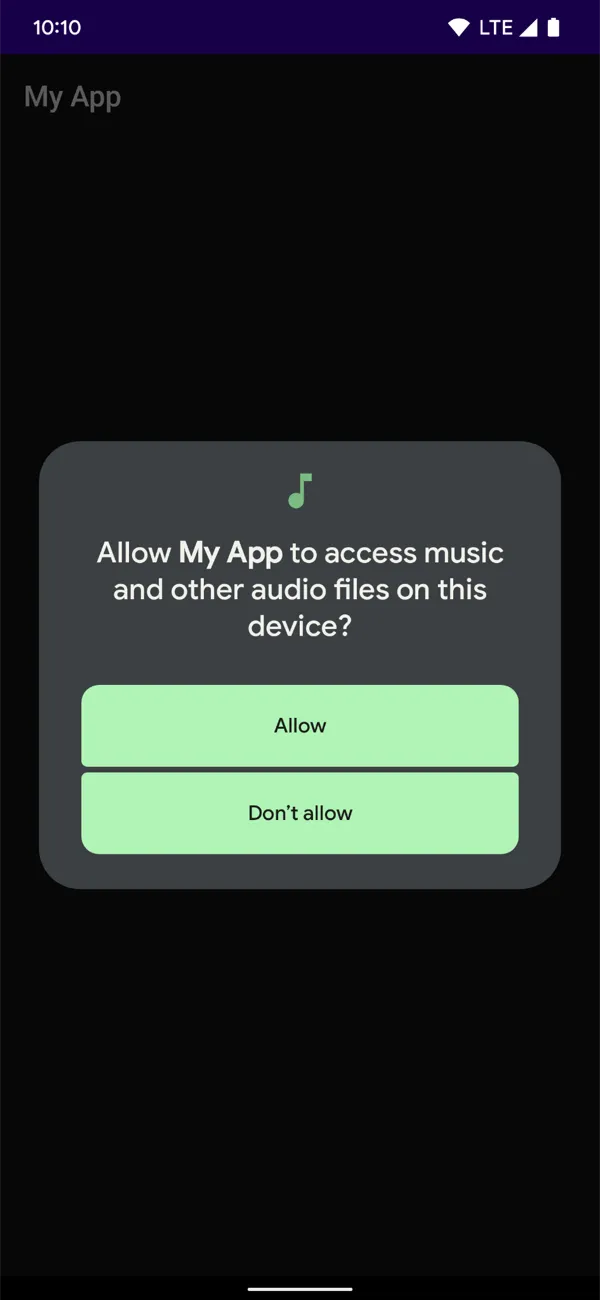
Images and video share one dialog if requested together. An app that held
READ_EXTERNAL_STORAGE gets the new media permissions automatically when it
updates its target.
Two more changes:
- Exact alarms.
USE_EXACT_ALARMis granted at install and cannot be revoked, but it is meant only for alarm clocks, timers and calendars, and a Google Play policy restricts it to them. Everyone else keepsSCHEDULE_EXACT_ALARM, which the user can revoke. - Giving permissions back.
Context.revokeSelfPermissionsOnKill()lets an app drop runtime permissions it no longer needs. It takes effect when the app’s processes are killed, not while it is in the foreground.
What changed for your app
All apps on Android 13
| Change | What to do |
|---|---|
| New installs start with notifications off | Target 33 and ask for POST_NOTIFICATIONS in context |
| The clipboard shows a preview of copied content | Set EXTRA_IS_SENSITIVE on passwords and card numbers; drop your own copy toast |
| Users can stop a foreground service from the Task Manager | Handle being stopped like a user force-stop |
| Foreground service notifications can be swiped away | Do not rely on the notification staying visible |
| Prefetch jobs run before the predicted next launch | Check that setPrefetch() work still runs when you expect |
| An app the user restricts for battery cannot start foreground services; its jobs and alarms do not run | Test with adb shell cmd appops set <package> RUN_ANY_IN_BACKGROUND ignore |
| High-priority FCM that never shows a notification is downgraded | Send normal priority when no notification follows |
| The Google app’s speech service trampoline is gone | Use the device’s default SpeechService, not a hard-coded package |
Apps targeting API 33
| Change | What to do |
|---|---|
| You control when the notification dialog appears | Request POST_NOTIFICATIONS after a user action, not at launch |
READ_EXTERNAL_STORAGE no longer gives access to others’ media | Request READ_MEDIA_*, or use the photo picker for images and video |
Wi-Fi APIs require NEARBY_WIFI_DEVICES | Declare it with android:usesPermissionFlags="neverForLocation" if you never derive location |
Intents from other apps must match your <intent-filter> | Check exported components; a sender gets ActivityNotFoundException on no match |
Background body sensor access needs BODY_SENSORS_BACKGROUND | Request it after BODY_SENSORS |
Advertising ID is zeros without AD_ID | Declare com.google.android.gms.permission.AD_ID if you use it |
BluetoothAdapter.enable() and disable() return false | Send the user to Bluetooth settings |
WebView.setForceDark() is a no-op | Let isLightTheme drive prefers-color-scheme; use setAlgorithmicDarkeningAllowed() |
No BOOT_COMPLETED while the user restricts your battery use | Do not depend on it for restricted apps |
Intent matching is not enforced for components without any intent filter, intents from inside the same app, and intents from the system or root.
What lasted
- Granular media access stayed, and Android 14 narrowed it further:
READ_MEDIA_VISUAL_USER_SELECTEDlets the user share only some photos. - Exact alarms. From Android 14,
SCHEDULE_EXACT_ALARMis denied by default for most new installs of apps targeting 33 or higher, which pushes apps toUSE_EXACT_ALARMor inexact alarms. - Exported receivers. The flag that was optional here became mandatory for context-registered receivers in apps targeting Android 14.
- Restricted settings grew. The Android 15 CDD requires them for device admin, display over other apps, usage access, the dialer and SMS roles and SMS permissions, besides accessibility and notification listeners.
- Predictive back left the developer option in Android 15, for apps that opted in.
- The photo picker now also reaches Android 4.4 to 10 as a backported module through Google Play services.
Worth knowing
- The Easter egg reuses Android 12’s clock; its unlock setting is still called
egg_mode_s. Set the hands to 1:00 and the code logs"13:00"before bubbles in Material You colours fill the screen. A long press cycles through 14 emoji sets, from fruit to zodiac signs. - One set never shipped. AOSP keeps it commented out with the note “this one is too much”.
TIRAMISUis the first constant spelled out as a dessert since Android 5.1’sLOLLIPOP_MR1; 6.0 to 12L used letters. In AOSP its comment is one word: “Tiramisu.”- Google first set the API 33 deadline as 1 August 2023 for new apps and 1 November 2023 for updates. It then moved both to 31 August, “unifying the dates to August 31 every year”.
Android 13 Developer Preview 1: photo picker
10 February 2022. The first Android 13 build, for developers only, brought the photo picker, the NEARBY_WIFI_DEVICES permission, themed app icons and per-app languages.
Read on its own: Android 13 Developer Preview 1: photo pickerGoogle released the first developer preview of Android 13 on 10 February 2022, six months before the Pixel rollout. It was a manual download for developers; Android Beta was not open for it. Google also said there would be only two previews this time before Beta 1.
| Release date | 10 February 2022 |
| Build | TPP1.220114.016 |
| Security patch | February 2022 |
| Devices | Pixel 4, 4 XL, 4a, 4a (5G), 5, 5a 5G, 6 and 6 Pro; 64-bit Android Emulator; GSI |
| How to get it | Flash a system image; later previews and betas then arrived over the air |
| Platform stability | No; Google expected it in June 2022 |
The privacy work started here. The system photo picker let a user share
chosen photos and videos without the app holding a storage permission, and
Google planned to bring it to Android 11 and later through a MediaProvider
module update. NEARBY_WIFI_DEVICES, in the NEARBY_DEVICES group, let
Wi-Fi apps scan and connect without location when they declare
neverForLocation.
For developers the build added the Quick Settings tile placement API, themed
app icons (on Pixel at first), a platform API for per-app languages, faster
hyphenation through the fullFast and normalFast frequencies,
RuntimeShader with AGSL, and the first OpenJDK 11 core library updates.
Bluetooth and Ultra-wideband became new Mainline modules. Most behaviour
changes could be toggled one by one from Developer options or adb.
Android 13 Developer Preview 2: notifications
17 March 2022. The second and last preview made posting notifications a runtime permission, POST_NOTIFICATIONS, and added COLRv1 emoji, LE Audio and MIDI 2.0.
Read on its own: Android 13 Developer Preview 2: notificationsDeveloper Preview 2 arrived on 17 March 2022, a week after the 12L feature drop reached AOSP. Devices already on Developer Preview 1 got it over the air.
| Release date | 17 March 2022 |
| Build | TPP2.220218.010 |
| Security patch | March 2022 |
| Devices | Pixel 4 to Pixel 6 Pro, as in Developer Preview 1; 64-bit emulator; GSI |
| How to get it | Flash a system image, or OTA from Developer Preview 1 |
| Platform stability | No |
The change that defined the release landed here: POST_NOTIFICATIONS. Apps
targeting Android 13 had to ask before posting a notification, and the system
handled the upgrade flow for older targets. Google warned that this flow
would still be tuned.
The same build added an API to give back granted runtime permissions, the
RECEIVER_EXPORTED and RECEIVER_NOT_EXPORTED flags for context-registered
receivers (recommended, not required), BODY_SENSORS_BACKGROUND, the
Foreground Services Task Manager, prefetch jobs in JobScheduler and APK
Signature Scheme v3.1. For text it brought phrase-based Japanese wrapping with
android:lineBreakWordStyle="phrase", taller line heights for non-Latin
scripts in apps targeting 13, text conversion APIs and COLRv1 vector emoji.
Built-in Bluetooth LE Audio and MIDI 2.0 over USB completed it.
Android 13 Beta 1: granular media permissions
26 April 2022. The first beta opened Android Beta before Google I/O and split READ_EXTERNAL_STORAGE into READ_MEDIA_IMAGES, READ_MEDIA_VIDEO and READ_MEDIA_AUDIO.
Read on its own: Android 13 Beta 1: granular media permissionsBeta 1 came out on 26 April 2022, two weeks before Google I/O, where betas had usually started. It opened Android Beta, so early adopters could enrol a Pixel and get the build over the air.
| Release date | 26 April 2022 |
| Build | TPB1.220310.029 |
| Security patch | April 2022 |
| Devices | Pixel 4 to Pixel 6 Pro; Android Emulator; GSI |
| How to get it | OTA through Android Beta, or flash; preview devices updated by OTA |
| Platform stability | No; still expected in June |
- Granular media permissions.
READ_MEDIA_IMAGES,READ_MEDIA_VIDEOandREAD_MEDIA_AUDIOreplacedREAD_EXTERNAL_STORAGEfor shared media in apps targeting 13. Images and video requested together share one dialog. - Keystore and KeyMint errors. New exceptions under
java.security.ProviderExceptioncarry the KeyMint error code and say whether a retry can help. - Audio routing.
AudioManager.getAudioDevicesForAttributes()andgetDirectProfilesForAttributes()tell a media app where its audio will go and whether it can play directly. - Media controls started to come from
PlaybackStateactions, and the legacy copy of the Google app’s speech service was removed.
Android 13 Beta 2: Google I/O and partners
11 May 2022. Released at Google I/O, Beta 2 reached phones from eleven partners and added predictive back APIs, the localeConfig file and the USE_EXACT_ALARM permission.
Read on its own: Android 13 Beta 2: Google I/O and partnersGoogle released Beta 2 at Google I/O on 11 May 2022. It was the first Android 13 build offered beyond Pixel: ASUS, HMD (Nokia), Lenovo, OnePlus, Oppo, Realme, Sharp, Tecno, Vivo, Xiaomi and ZTE ran their own beta programmes on selected phones, tablets and foldables.
| Release date | 11 May 2022; Beta 2.1 on 26 May 2022 |
| Build | TPBB.220414.015; 2.1 TPBB.220414.018 |
| Security patch | May 2022 |
| Devices | Pixel 4 to Pixel 6 Pro; partner devices; Android Emulator; GSI |
| How to get it | OTA through Android Beta on Pixel; partners handled their own enrolment |
| Platform stability | No; Google called it “just a step away” |
Three developer features arrived: the ahead-of-time back APIs behind
predictive back, a resource file that lists an app’s supported languages
(android:localeConfig), and USE_EXACT_ALARM, the install-time permission
for alarm clocks and calendars.
Beta 2.1 fixed crashes when turning on the hotspot or disconnecting from Android Auto, a blank list of search suggestions, and a dialing sound heard during calls.
Android 13 Beta 3: platform stability, API 33
8 June 2022. Beta 3 reached platform stability: the API 33 SDK and NDK and every app-facing behaviour became final, two months earlier than Android 12 did.
Read on its own: Android 13 Beta 3: platform stability, API 33Beta 3 came out on 8 June 2022 and took Android 13 to platform stability. From this build the official API 33 SDK and NDK, the app-facing behaviours and the non-SDK interface lists were final, so developers could ship compatibility updates knowing the platform would not change.
| Release date | 8 June 2022; Beta 3.1 on 10 June, 3.2 on 16 June, 3.3 on 27 June |
| Build | TPB3.220513.017; 3.1 TPB3.220513.017.B1; 3.2 TPB3.220610.004; 3.3 TPB3.220617.002 |
| Security patch | June 2022 |
| Devices | Pixel 4 to Pixel 6 Pro; partner devices; Android Emulator; GSI |
| How to get it | OTA through Android Beta, or flash |
| Platform stability | Yes: final APIs and final app-facing behaviour |
The only feature the release notes list as new is copy and paste: the
clipboard preview that apps must keep from showing passwords. Google’s
checklist for all apps named the notification permission, that clipboard
preview and JobScheduler prefetch.
Three point releases followed in June. Beta 3.1 restored the Android Beta Feedback app. Beta 3.2 fixed apps crashing on open, the back gesture failing in some apps and the microphone switching on and off by itself. Beta 3.3 fixed a System UI crash on the back gesture, Wi-Fi networks that would not connect, phones left unresponsive after charging overnight, and a kernel panic.
Android 13 Beta 4: the release candidate
13 July 2022. The last beta was a release candidate for Pixel and the emulator, with nothing new for developers; Beta 4.1 followed on 25 July with bug fixes.
Read on its own: Android 13 Beta 4: the release candidateBeta 4 was released on 13 July 2022 as “a final update for your testing and development”. It was a release candidate build for Pixel and the Android Emulator. Since platform stability came at Beta 3, it changed no API or behaviour; it carried fixes and optimisations.
| Release date | 13 July 2022; Beta 4.1 on 25 July 2022 (1 August on the Pixel 6a) |
| Build | TPB4.220624.005; 4.1 TPB4.220624.008, TPB4.220624.008.A2 on the Pixel 6a |
| Security patch | July 2022 |
| Devices | Pixel 4 to Pixel 6 Pro; the Pixel 6a from Beta 4.1; partner devices; emulator; GSI |
| How to get it | OTA through Android Beta, or flash |
| Platform stability | Yes, since Beta 3 |
Beta 4.1 fixed apps that could not turn Bluetooth on or off without
BLUETOOTH_CONNECT even though their target did not need it, crashes and
reboots on some Wi-Fi networks, Meet calls dropping while driving and wrong
readings of GPS data. The final release reached AOSP and Pixel phones on
15 August 2022.

