Android 12L is the release Google made for large screens. It gave tablets, foldables and ChromeOS devices a taskbar, drag-and-drop split screen and a two-column system UI. For developers it brought a new API level, 32, without a single breaking change, so nothing forced an app to target it.
12L is a feature drop for Android 12, not a new version of it. Everything Android 12 changed for apps still applies, and that note covers it.
At a glance
| Version | Android 12L |
| API level | 32 |
| Name | 12L, public. Internally “S V2” (Sv2 in the SDK Manager); see below |
Build.VERSION_CODES | S_V2 |
| Release | Pixel rollout began 7 March 2022 |
| Launch devices | Pixel 3a to Pixel 5a first; Pixel 6 and 6 Pro from the April 2022 build |
| Google Play target-API deadline | None. Google said apps would not have to target 12L, and Play moved from 31 to 33 |
Google announced 12L on 7 March 2022 and released it to AOSP that week. The
first build, SP2A.220305.012, went to the Pixel 3a, 4, 4a, 4a (5G), 5 and 5a.
The Pixel 6 and 6 Pro got their first 12L build, SP2A.220405.004, with the
April update. For other makers, Google said 12L would reach tablets and foldables from Samsung, Lenovo and Microsoft “later
this year”.
Before that came Developer Preview 1 on 27 October 2021, Beta 1 on 8 December 2021 with the final API 32, Beta 2 on 12 January 2022 and Beta 3 on 9 February 2022. Each one has its own part below.
The name. Google used “12L” in public and never a dessert. The code says
S_V2, its comment says “S V2”, AOSP branches are called android-s-v2-*, and
the SDK Manager lists the platform as Android 12L (“Sv2”). Android 12 was Snow
Cone, a name Dave Burke confirmed in October 2021. “Snow Cone v2” follows from
it, but neither the code nor Google’s documentation uses that name.
What it brought
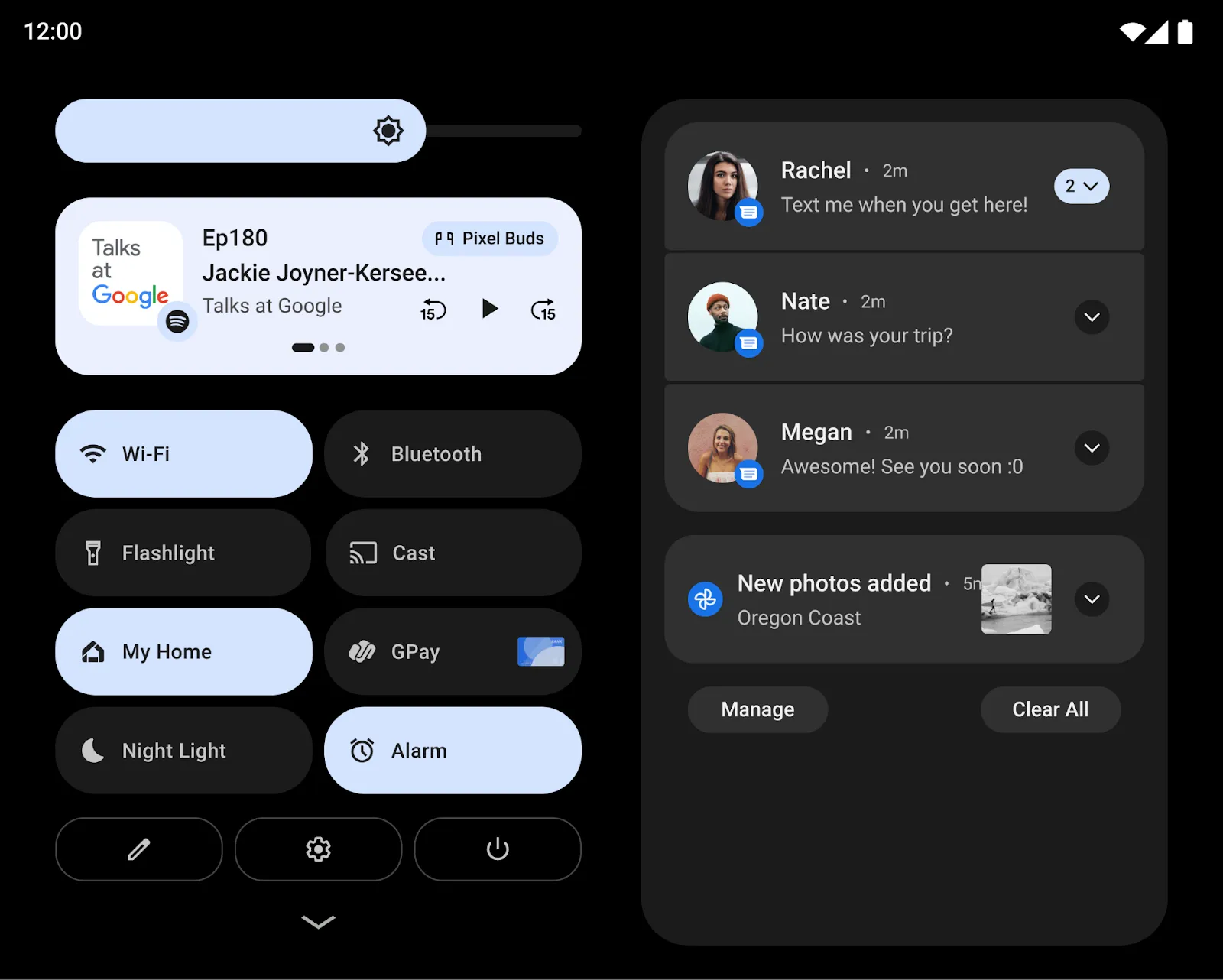
- Two-column system UI. On large screens, the notification shade shows Quick Settings and notifications in two columns. The lock screen uses two columns for notifications and the clock, and setup and Settings use the space too.
- Taskbar. A taskbar on large screens launches and switches apps. Users drag an app from it to start split screen, swipe up to go home, and long-press to show or hide it.
- Split screen from Overview. A new “Split” action in Overview starts split screen with one tap.
- Lock screen controls on the side. On tablets the PIN and pattern pad sits at one side of the screen. Tapping the other side moves it there.
- Foldables. A tuned home screen grid and a smoother fold-unfold transition between the outer and inner screens.
- Spatial audio APIs.
Spatializer, obtained withAudioManager.getSpatializer(), reports whether and how the device spatializes sound.AudioAttributesgainedsetSpatializationBehavior(), andAudioFormatgained channel masks up to 9.1.6. - Accessible drag and drop.
ACTION_DRAG_START,ACTION_DRAG_DROPandACTION_DRAG_CANCELlet an accessibility service start a drag. The view then receivesDRAG_FLAG_ACCESSIBILITY_ACTIONand the system drags without animations. - Foldable cameras.
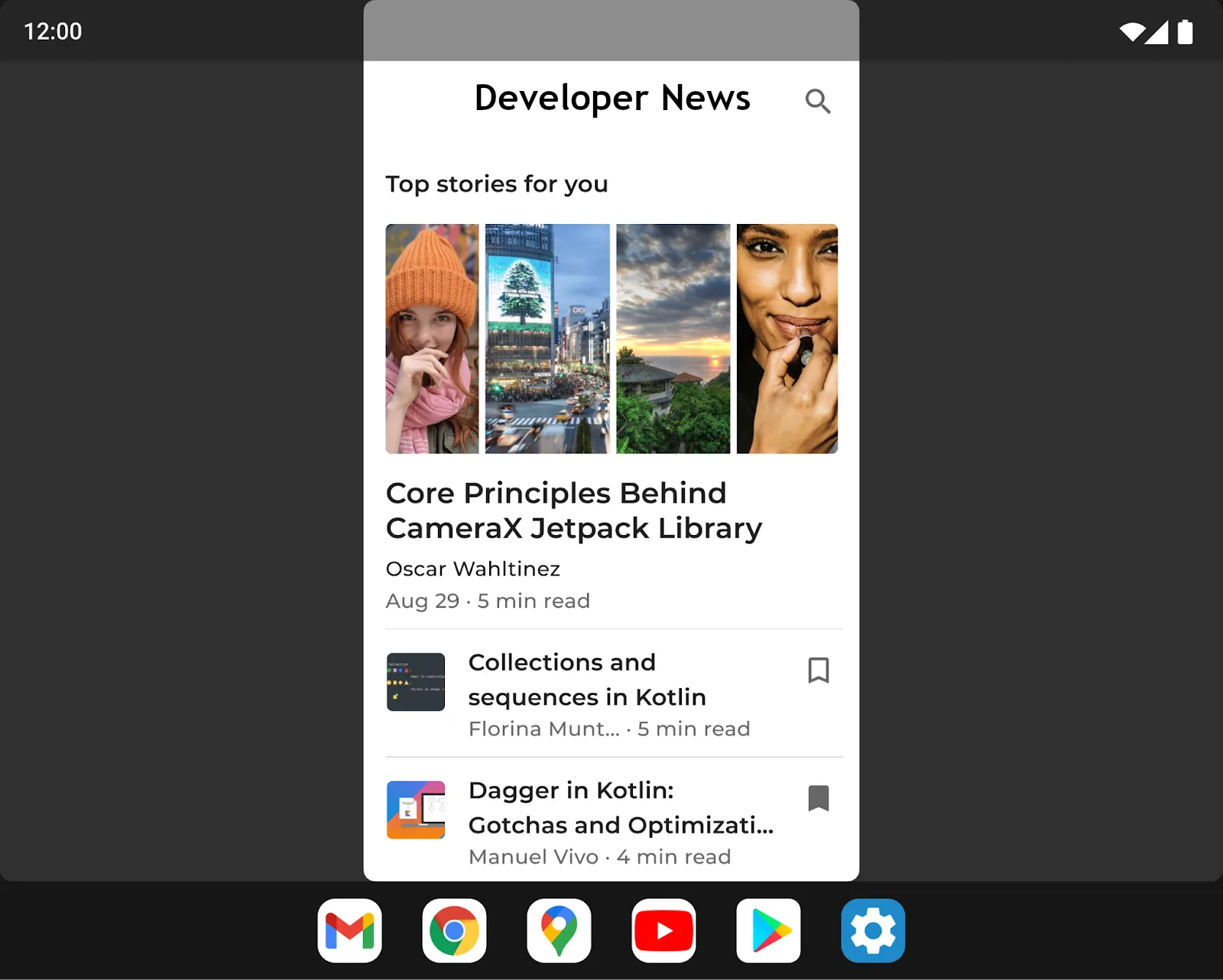
CameraCharacteristics.INFO_DEVICE_STATE_SENSOR_ORIENTATION_MAPmaps each fold state to the camera sensor orientation, for logical cameras whose physical sensors differ. - Activity embedding. Jetpack WindowManager shows two activities side by side, such as a list and its detail, with little or no refactoring. It shipped as experimental in WindowManager 1.0.0-beta03 on 27 October 2021. It runs on large screens with Android 12L or higher whose maker includes the window extensions interface.
Security and privacy
12L added no new security features of its own: Google’s list of security enhancements per release has no 12L entry. It shipped with the fixes of its own security release notes, which list 56 CVEs: 3 rated High, 52 Moderate and one with unknown severity. Builds from AOSP default to security patch level 2022-03-01.
Permissions
One new permission, and apps from the Play Store cannot get it.
LAUNCH_MULTI_PANE_SETTINGS_DEEP_LINK is signature|preinstalled. It lets a
system or preinstalled app open its own screen inside the two-pane Settings app
with Settings.ACTION_SETTINGS_EMBED_DEEP_LINK_ACTIVITY. No runtime permission
changed.
What changed for your app
Google promised no breaking changes, and 12L has no behaviour-change page of its own: its overview links to Android 12’s. What changed reaches every app on a large screen, whatever it targets:
| Change | What to do |
|---|---|
| The taskbar is reported as an inset, and it can appear or hide at any time | Read insets with ViewCompat.setOnApplyWindowInsetsListener(); the taskbar counts in navigationBars() and systemBars() |
| Any app can be dragged into split screen (since Android 12) | Test split screen with windows of several sizes, even with resizeableActivity="false" |
A virtual display from MediaProjection is scaled to fit its surface, like centerInside | Check screen recording and casting, also when the device folds |
| Device makers can customise letterboxing: position left or right, and a redesigned restart button | Use responsive layouts for screens wider than 600dp, and test in compatibility mode |
| From 12L, some large screens ignore an app’s fixed orientation and letterbox it | Support both orientations, or test what users see |
| Play checks apps against its large screen quality guidelines | An app that fails shows large screen users a notice on its listing, and Play adds large-screen ratings |
To build against 12L, set compileSdkVersion and targetSdkVersion to 32.
Use WindowMetrics from Jetpack WindowManager instead of
Display.getRealSize() to size your layout.
What lasted
- Large screen work. Android 13 says it “builds on” the tablet optimizations of 12L: system UI, multitasking and compatibility modes.
- Letterboxing kept growing. Android 13 added a dialog that teaches users to move a letterboxed app or put it in split screen.
- Activity embedding became a larger API in WindowManager 1.1.0 (June
2023), with
ActivityEmbeddingControllerand a manifest property to enable splits. - API 32 stayed optional. Play’s deadline went from API 31 in 2022 to API 33 in August 2023. Google’s rule counts “major” releases, and 12L was a feature drop.
- Security patches for 12L ended with Android 12’s. The March 2025 Android Security Bulletin is the last to list 12L among the updated AOSP versions.
Worth knowing
- The
S_V2constant carries a line of Shakespeare in its doc comment: “Once more unto the breach, dear friends, once more.” It opens Henry V’s speech to his soldiers before Harfleur, in Act 3, Scene 1. - On 12L,
Build.VERSION.RELEASEstill says12. The build setsPLATFORM_VERSION_LAST_STABLE := 12, and source.android.com lists 12L as version 12, CTS 12.1. CheckSDK_INT >= 32, never the version string. - API 32 removed a deprecation.
Environment.getExternalStorageDirectory(),getExternalStoragePublicDirectory()andMediaStore.MediaColumns.DATA, deprecated in Android 10, are no longer deprecated, and they still are not. - Google counted “over a quarter billion” Android large screen devices, across tablets, foldables and ChromeOS, when it announced 12L in October 2021.
12L Developer Preview 1: emulator only
27 October 2021. Announced at Android Dev Summit, the first 12L build ran only in the emulator, with the taskbar, two-column UI and provisional API level Sv2.
Read on its own: 12L Developer Preview 1: emulator onlyGoogle announced 12L at Android Dev Summit on 27 October 2021 and released Developer Preview 1 the same day. It was for developers only, and it ran only in the Android Emulator: phones did not get it.
| Release date | 27 October 2021 |
| Build | SPP4.211001.003 |
| Security patch | October 2021 |
| Devices | Android Emulator (x86 64-bit and ARM v8-A); later the Lenovo Tab P12 Pro |
| Platform stability | No; provisional API level Sv2, and Google expected API changes before final |
The build already had what 12L is known for: the two-column notification shade and lock screen on screens above 600dp, the taskbar with drag-and-drop into split screen, and letterboxing that device makers can customise. Dave Burke’s post promised no breaking changes, so Google would not require apps to target 12L.
To use the new APIs, an app had to set compileSdkVersion,
targetSdkVersion and minSdkVersion to "Sv2". Google Play blocked
publishing apps that targeted Sv2. Google’s advice was to test the current
app in split screen with windows of several sizes and in the new
compatibility mode. Lenovo later offered the same Developer Preview 1 for its
Tab P12 Pro, the first real tablet that could run 12L.
12L Beta 1: final API 32 and Pixel phones
8 December 2021. The first 12L build for Pixel phones through Android Beta, and the first with the final APIs at level 32, earlier than Google's own timeline had planned.
Read on its own: 12L Beta 1: final API 32 and Pixel phonesBeta 1 came out on 8 December 2021. It was the first 12L build for phones and the first with final APIs. Google “finalized the APIs early”: its preview timeline had planned final APIs for Beta 2.
| Release date | 8 December 2021 |
| Build | S2B1.211112.006 |
| Security patch | December 2021 |
| Devices | Pixel 3a, 4, 4a, 4a (5G), 5 and 5a over the air; Android Emulator; GSI |
| Platform stability | Yes; the official API 32 SDK, with an API diff from Sv2 DP1 to 32 |
Pixel owners got it by enrolling in Android Beta, and phones still enrolled in the Android 12 Beta received it automatically. The Pixel 6 and 6 Pro were listed as “coming soon”. On a phone the large-screen features do not appear, but the build carried the December security patch and the bug fixes.
With API 32 final, developers could compile against the official SDK. Google asked them to watch feedback from Beta users and release compatible updates without changing the app’s target. Lenovo was still offering Developer Preview 1 for the Tab P12 Pro, with updates “in the weeks ahead”.
12L Beta 2: bug fixes, still no Pixel 6
12 January 2022. An incremental update with the January patch and fixes for the lock screen clock, Recents and gesture navigation. The Pixel 6 still could not get 12L.
Read on its own: 12L Beta 2: bug fixes, still no Pixel 6Beta 2 came out on 12 January 2022, an “incremental beta update” with no new APIs. Google did not announce it on the Android Developers Blog; the date and build come from its 12L release notes.
| Release date | 12 January 2022 |
| Build | S2B2.211203.006 |
| Security patch | January 2022 |
| Devices | Pixel 3a, 4, 4a, 5 and 5a series; Android Emulator; GSI |
The fixes Google listed: the lock screen clock was not centred, Recents showed every app as a black image with “App isn’t available”, and gesture navigation sometimes left an image of the previous app over the current one. Lock screen icons that were too small on large screens and widget bitmaps that disappeared were fixed too. For the Pixel 6, Google said it was “working to bring 12L to Pixel 6 soon”.
Google’s timeline asked developers to start final compatibility testing and release compatible versions at this milestone. Its overview page still said APIs finalize “Starting at Beta 2”, a line written before Beta 1 shipped them early.
12L Beta 3: the last beta, now on Pixel 6
9 February 2022. The final 12L beta reached the Pixel 6 and 6 Pro for the first time, with the February patch and fixes for At a glance, the screen-off animation and split screen.
Read on its own: 12L Beta 3: the last beta, now on Pixel 6Beta 3 came out on 9 February 2022 and was the last 12L beta. It was the first 12L build for the Pixel 6 and 6 Pro. Like Beta 2, it has no blog post; the date and build come from Google’s 12L release notes.
| Release date | 9 February 2022 |
| Build | S2B3.220205.007.A1 |
| Security patch | February 2022 |
| Devices | Pixel 3a, 4, 4a, 5, 5a and 6 series; Android Emulator; GSI |
Google listed three fixes: weather missing from the At a glance widget, a screen-off animation that did not always play, and launcher crashes when entering split screen with “Pin to Top”.
Pixel 6 phones that took the newer February update, SQ1D.220205.004, could
not install Beta 3. 9to5Google quoted Google saying those phones would get
“the next upcoming beta build release in March” instead. Google’s release
notes do not list a March build, so this note does not count one as a
milestone. The final release followed on 7 March 2022.

