Android 12 is the release where the wallpaper picked the colors of the whole
system. For users it brought Material You, a privacy dashboard and switches that
cut off every app’s camera and microphone. For developers targeting API 31 it
made android:exported and PendingIntent mutability mandatory, and it stopped
foreground services from starting in the background.
At a glance
| Version | Android 12 |
| API level | 31 |
| Name | Snow Cone, internal codename. Public name: Android 12 |
Build.VERSION_CODES | S |
| Release | Pixel rollout began 19 October 2021 |
| Launch devices | Pixel 6 and Pixel 6 Pro, announced 19 October 2021, in stores from 28 October |
| Google Play target-API deadline | New apps from 1 August 2022, updates from 1 November 2022 |
Google announced Android 12 with Developer Preview 1 on 18 February 2021. Beta 1 followed on 18 May at Google I/O, and Beta 4 reached platform stability on 11 August, freezing the APIs and app-facing behaviour. The three developer previews and five betas are the parts below this overview.
Google pushed the Android 12 source to AOSP on 4 October 2021. Phones waited
two more weeks: the rollout started on 19 October, for the Pixel 3 and newer,
the same day Google announced the Pixel 6 and Pixel 6 Pro. Google named Samsung,
OnePlus, Oppo, realme, Tecno, Vivo and Xiaomi for later in the year. The first
build, SP1A.210812.015, covered the Pixel 3 to the Pixel 5a.
The codename was Snow Cone. In AOSP the release branches are sc-dev and
sc-release, the prefix the commits at the android-12.0.0_r1 tag merge into.
On 4 October 2021 Dave Burke, Android’s VP of engineering, posted “A cool
background to celebrate the launch of Android Snow Cone!”, which TechRadar and
Android Central reported. The SDK constant stays S, and Google never used the
name in its own release posts.
What it brought
- Material You. A new design language with larger controls, a redesigned notification shade and Quick Settings, and widgets with rounded corners.
- Dynamic color. The system builds a palette from the wallpaper and applies
it to the lock screen, notifications, settings, widgets and apps that opt in.
Apps read it through 65 new color resources, five palettes of 13 tones each
(
system_accent1_0tosystem_neutral2_1000). Google shipped it on Pixel first. - Splash screens. Every app gets a system splash screen on cold and warm
starts, built from its icon and theme. The
SplashScreenAPI customizes it with attributes such aswindowSplashScreenAnimatedIcon. - Stretch overscroll. Lists stretch and bounce at the edge instead of showing a glow.
- Scrolling screenshots. A screenshot can grow to capture a whole scrolling
page. Apps can feed the scrolled content of a custom view to the system with
ScrollCaptureCallback, set throughView.setScrollCaptureCallback()orWindow.registerScrollCaptureCallback(). - Power button. On Pixel, a long press of the power button opens Google Assistant, and the power menu moves to a button in Quick Settings. The smart home controls and Google Pay that Android 11 put in the power menu became Quick Settings tiles.
- Accessibility. A window magnifier zooms part of the screen and keeps the rest visible, and “Extra dim” lowers the screen below its minimum brightness.
- Rich content insertion. One callback,
OnReceiveContentListener, receives images and other content from the clipboard, the keyboard or drag and drop. - Graphics and media.
RenderEffectblurs and filters a view in one call, AVIF images decode natively, and the system can transcode HEVC and HDR video to AVC for apps that cannot read it. - Notifications.
Notification.CallStylefor calls, animated images in messaging and big picture styles, and notification actions that require an unlocked device (setAuthenticationRequired()). - Smaller additions. Rounded corner APIs (
RoundedCorner), richer haptics (VibratorManager), haptics generated from an audio session (HapticGenerator), a Game Mode API, AppSearch, picture-in-picture that enters on its own (setAutoEnterEnabled()), and the chipset name inBuild.SOC_MANUFACTURERandBuild.SOC_MODEL.
Google’s developer post said Android 12 cut the CPU time used by core system services by 22%.
Android 12 (Go edition), for entry-level phones, followed. Google introduced it on 14 December 2021 for phones arriving in 2022. It said apps there launch up to 30% faster, unused apps hibernate automatically, and the privacy dashboard comes along.
Security and privacy
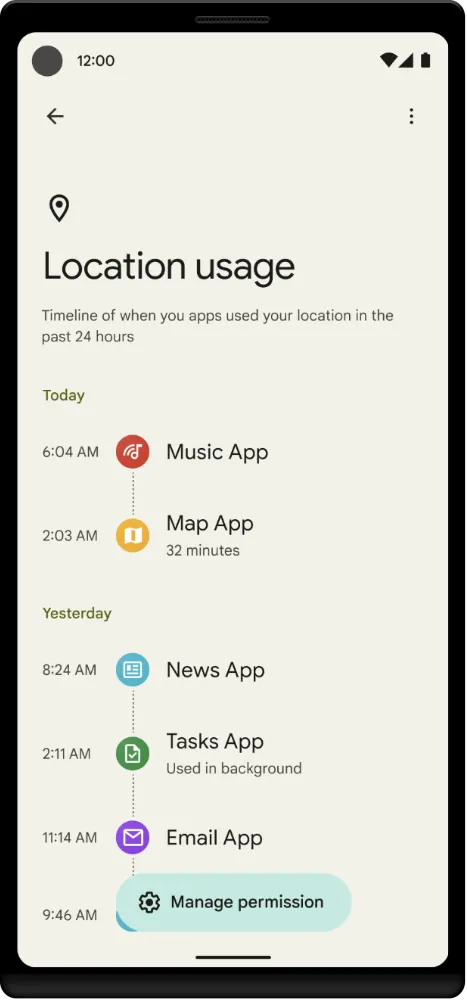
- Privacy dashboard. A Settings screen shows a timeline of which apps used
location, camera and microphone in the past 24 hours. An app can explain each
access with an activity guarded by
START_VIEW_PERMISSION_USAGEthat handlesVIEW_PERMISSION_USAGE_FOR_PERIOD. - Camera and microphone indicators. A status bar icon appears whenever an app uses either sensor. AOSP makes the indicators mandatory for all device makers.
- Camera and microphone toggles. “Camera access” and “Mic access” in Quick Settings turn the sensor off for every app. A blocked app gets a blank camera feed or silent audio, without an error. Emergency calls turn the microphone back on.
- Clipboard toast. The first time an app reads another app’s clip with
getPrimaryClip(), the system shows “APP pasted from your clipboard”.getPrimaryClipDescription()does not trigger it. - Private Compute Core. An isolated, open source part of the OS where Live Caption, Now Playing and Smart Reply process data on the device. Features inside it have no direct network access; model updates come through Private Compute Services.
- Overlays. Touches that pass through an obscuring window are blocked, apps
can hide other apps’ overlays with
HIDE_OVERLAY_WINDOWS, and preinstalled apps no longer getSYSTEM_ALERT_WINDOWautomatically. - Platform. ART becomes a Mainline module (
com.android.art), so Google can update the runtime through Google Play system updates. Rust is supported for platform code. New phones ship the Generic Kernel Image, and Ars Technica called the Pixel 6 the first GKI phone. Users can also turn off 2G, and work profiles lose access to the IMEI and serial number. - Crypto. The deprecated BouncyCastle algorithms, including every AES variant, are gone in favor of Conscrypt.
Permissions
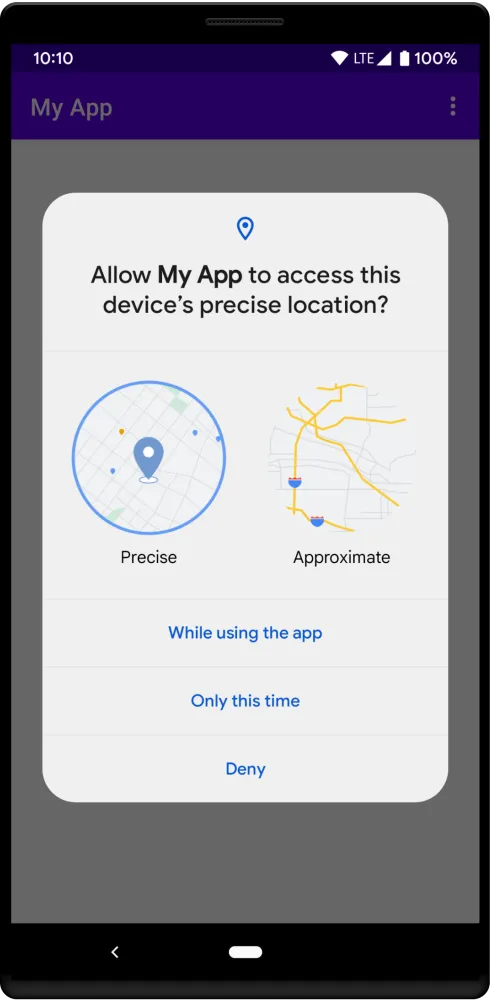
- Approximate location. When an app asks for
ACCESS_FINE_LOCATION, the dialog offers “Precise” or “Approximate”, next to the one-time options from Android 11. The app must requestACCESS_COARSE_LOCATIONin the same call, or on some Android 12 releases the dialog does not appear at all.
- Nearby devices.
BLUETOOTH_SCAN,BLUETOOTH_CONNECTandBLUETOOTH_ADVERTISEare new runtime permissions, shown to the user as “Nearby devices”, along withUWB_RANGING. They replaceBLUETOOTHandBLUETOOTH_ADMINfor apps targeting 31. An app that never derives location from scans addsusesPermissionFlags="neverForLocation"and dropsACCESS_FINE_LOCATION. - Exact alarms. For apps targeting 31,
SCHEDULE_EXACT_ALARMis an app-op permission granted in the “Alarms & reminders” special access screen. CallcanScheduleExactAlarms()before setting one; if the user revokes it, the app stops and its exact alarms are cancelled. - Fast sensors. For apps targeting 31, the accelerometer, gyroscope and
magnetometer are capped at 200 Hz through
registerListener(). Higher rates needHIGH_SAMPLING_RATE_SENSORS, and with the microphone toggle off the cap applies anyway. - Hibernation. For apps targeting 31, the permission auto-reset of Android 11 grows: an app the user has not opened for a few months also loses its jobs, alarms, push messages and cache. The switch is “Remove permissions and free up space” in App info.
- Updates without a prompt. An app store that declares
UPDATE_PACKAGES_WITHOUT_USER_ACTION, a normal permission granted at install, can callsetRequireUserAction(USER_ACTION_NOT_REQUIRED)on aPackageInstallersession and update apps without a confirmation dialog. It works only for apps it installed, or for itself, and on Android 12 only when the updated app targets API 29 or higher.
What changed for your app
All apps on Android 12
| Change | What to do |
|---|---|
| The system shows its own splash screen | Move a custom splash activity to the SplashScreen API |
| Users can pick approximate location | Request ACCESS_FINE_LOCATION and ACCESS_COARSE_LOCATION together |
| Camera and microphone toggles can block your app silently | Check SensorPrivacyManager.supportsSensorToggle() and expect empty data |
| Generic web links open your app only for approved domains | Verify the domain with Android App Links (https, BROWSABLE) |
| Back on a launcher root activity moves the task to the background | Call super.onBackPressed() instead of finish() |
| Untrusted touches through overlays are blocked | Keep overlays at or below 0.8 combined opacity, or out of the way |
ACTION_CLOSE_SYSTEM_DIALOGS is deprecated and no longer works | Drop it; accessibility services use GLOBAL_ACTION_DISMISS_NOTIFICATION_SHADE |
| Apps can land in the restricted standby bucket | Check getAppStandbyBucket() for STANDBY_BUCKET_RESTRICTED |
| BouncyCastle AES and 512-bit keys are gone | Use Conscrypt key sizes and a 12-byte IV for GCM |
Display.getRealSize() and getRealMetrics() are deprecated | Use WindowMetrics |
Apps targeting API 31
| Change | What to do |
|---|---|
Components with an intent filter must declare android:exported | Set true for the launcher activity and anything others call, false otherwise |
Every PendingIntent must state its mutability | Pass FLAG_IMMUTABLE, or FLAG_MUTABLE only when the intent must be filled in |
| Foreground services cannot start from the background | Use WorkManager expedited work, or an exact alarm for a user-requested action |
| Notification trampolines are blocked | Point setContentIntent() straight at the activity |
Exact alarms need SCHEDULE_EXACT_ALARM | Declare it, check canScheduleExactAlarms(), and use exact alarms only for user-facing timing |
| Bluetooth needs the new runtime permissions | Declare and request BLUETOOTH_SCAN, BLUETOOTH_CONNECT or BLUETOOTH_ADVERTISE |
| Custom notification views sit in a system template, 48dp tall when collapsed | Test them in the shade and provide an expanded view |
Backup rules move to android:dataExtractionRules | Write separate <cloud-backup> and <device-transfer> rules |
adb backup leaves app data out | Test backups with a debuggable build |
WebView treats cookies without SameSite as Lax | Set SameSite=None; Secure on cross-site cookies |
| Vendor native libraries are hidden | Declare each one with <uses-native-library> |
Without android:exported, the app does not install on Android 12: the build
fails with a manifest merger error. A missing mutability flag fails at runtime,
and lint flags it as UnspecifiedImmutableFlag.
The foreground service rule throws ForegroundServiceStartNotAllowedException.
The exceptions include a high-priority FCM message, a tap on the app’s
notification or widget, an exact alarm, BOOT_COMPLETED, and apps the user
exempted from battery optimization.
Calling startForegroundService() anyway on the “no” branch is what throws the
exception.
What lasted
- Material You and dynamic color remain Android’s design base, and the 65 system color resources are still the way apps read the palette.
- The Nearby devices group grew: Android 13 added
NEARBY_WIFI_DEVICES, so Wi-Fi scanning no longer needs location either. - Exact alarms tightened. Android 13 added
USE_EXACT_ALARMfor alarm and calendar apps and stopped pre-grantingSCHEDULE_EXACT_ALARMto new installs of apps targeting 33. - Hibernation stayed. From Android 13 the switch reads “Pause app activity if unused”.
- Foreground services kept narrowing: apps targeting Android 14 must declare a type for every one.
- The splash screen reached older devices through
androidx.core:core-splashscreen, which brings it to API 23. - ART as a module paid off. In 2023 Google said its ART updates reached all Android 12 and newer devices, with app startup up to 30% faster on some.
- Security patches ran until March 2025. That month’s Android Security Bulletin still lists 12 and 12L among the updated AOSP versions; from April 2025 the list starts at Android 13.
The point release that followed, Android 12L (API 32), reworked the system for large screens and has its own note in this series.
Worth knowing
- The Easter egg is an analog clock. Drag its hands to 12:00 and the next stage starts; the code logs “12:00 let’s gooooo”.
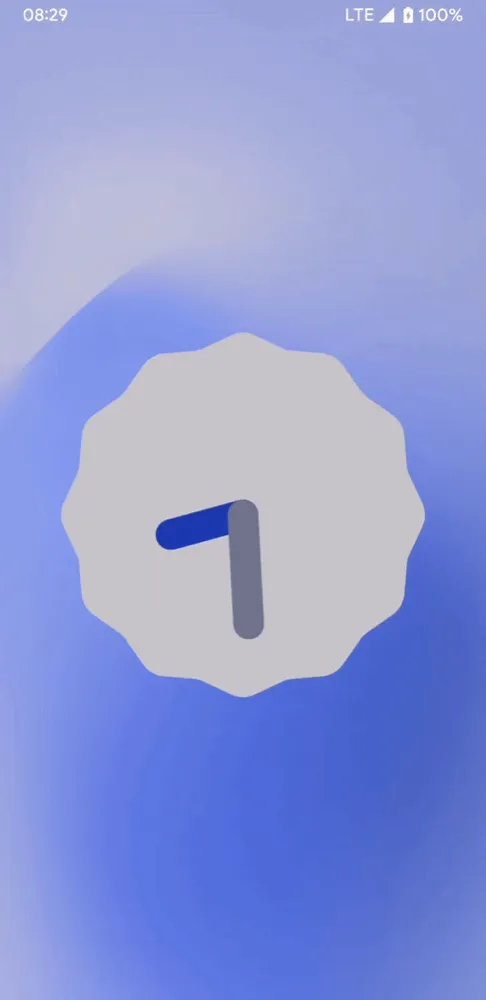
- The background then fills with bubbles drawn from the system accent palette, and the egg unlocks Paint Chips, a home screen widget that shows the dynamic color palette “in a manner similar to a set of paint samples from a hardware store”, as the AOSP string comment puts it.
- In AOSP the wallpaper-to-theme code sits behind a flag named Monet
(
isMonetEnabled()in SystemUI’sThemeOverlayController). Ars Technica’s review reported Monet as the color system’s codename. - The
Sconstant in AOSP’sBuild.javacarries a one-word comment:S..
Android 12 Developer Preview 1: flash only
18 February 2021. The first Android 12 build, for developers only, made android:exported and PendingIntent mutability mandatory and blocked background foreground service starts.
Read on its own: Android 12 Developer Preview 1: flash onlyGoogle released the first developer preview of Android 12 on 18 February 2021, eight months before the Pixel rollout. Dave Burke’s post called it “just the start”, and Android Beta was not open for it.
| Release date | 18 February 2021; Developer Preview 1.1 on 3 March 2021 |
| Build | SPP1.210122.020.A3; 1.1 SPP1.210122.022 |
| Security patch | February 2021; 1.1 March 2021 |
| Devices | Pixel 3, 3a, 4, 4a, 4a 5G and 5; 64-bit Android Emulator images; a separate Android TV build |
| How to get it | Flash a factory image, or sideload an OTA image on a Pixel running Android 11, without a wipe |
| Platform stability | No; Google expected it by August 2021 |
The rules that later defined targeting API 31 were already here:
components with an intent filter had to declare android:exported, every
PendingIntent needed FLAG_MUTABLE or the new FLAG_IMMUTABLE, and
foreground services could no longer start from the background. To replace
them Google added expedited jobs to JobScheduler and WorkManager.
Notification trampolines were blocked for apps targeting the new platform,
and every app got a toast when it used one.
The build also brought compatible media transcoding from HEVC to AVC, AVIF
images, OnReceiveContentListener for rich content, haptics coupled to an
audio session, and WebView’s SameSite cookie behaviour. The Netlink MAC
restriction from Android 11 now applied to every app, whatever its target.
ART became a Mainline module. Most behaviour changes could be toggled one by
one from Developer options or adb.
Developer Preview 1.1 fixed Wi-Fi drops, a System UI crash on screenshots from the lock screen, battery drain from partial wake locks, and an unresponsive fingerprint reader.
Android 12 Developer Preview 2: effects
17 March 2021. The second preview added RenderEffect blurs, rounded corner APIs, overlay hiding, app checksums, CompanionDeviceService and lock screen authentication for actions.
Read on its own: Android 12 Developer Preview 2: effectsDeveloper Preview 2 came out on 17 March 2021, four weeks after the first. It was still for developers only, by manual flash or over the air for anyone already on Preview 1.
| Release date | 17 March 2021; 2.1 on 29 March; 2.2 on 7 April 2021 |
| Build | SPP2.210219.008; 2.1 SPP2.210219.008.A1; 2.2 SPP2.210219.018 |
| Security patch | March 2021; 2.2 April 2021 |
| Devices | Pixel 3, 3a, 4, 4a, 4a 5G and 5; Android Emulator; Android TV on the ADT-3 kit |
| How to get it | Flash or sideload; over the air from Preview 1 or 1.1 |
| Platform stability | No |
Preview 2 was about graphics, windows and companion devices:
RenderEffectblurs or colour-filters any view in one call (View.setRenderEffect()), andWindow.setBackgroundBlurRadius()blurs the window background.Display.getRoundedCorner()andWindowInsets.getRoundedCorner()return aRoundedCornerwith its radius and centre.Window.setHideOverlayWindows()hides everyTYPE_APPLICATION_OVERLAYwindow over the app, for screens such as payment confirmation.PackageManager.requestChecksums()returns the digest of an installed app.CompanionDeviceServicekeeps a watch or tracker app bound while the device is nearby.- Notification actions can require authentication when tapped on the lock screen.
- Auto-enter picture-in-picture on swipe up to home, stashing at the screen edge, and resizing for non-video content.
Google told developers to ship a compatible update by Beta 1, without
changing targetSdkVersion. Developer Preview 2.1 updated WebView to fix app
crashes. Developer Preview 2.2 fixed a Settings crash in Bluetooth settings,
home screen widgets removed by an OTA, and Wi-Fi passwords that were not
saved.
Android 12 Developer Preview 3: splash screens
21 April 2021. The last developer preview added the system splash screen, CallStyle notifications, SCHEDULE_EXACT_ALARM, new web link handling and the RenderScript deprecation.
Read on its own: Android 12 Developer Preview 3: splash screensDeveloper Preview 3 came out on 21 April 2021, four weeks before Google I/O. It was the last developer-only build; Google asked for compatible app updates “over the next few weeks”, ahead of Beta 1.
| Release date | 21 April 2021 |
| Build | SPP3.210325.010 |
| Security patch | April 2021 |
| Devices | Pixel 3, 3a, 4, 4a, 4a 5G and 5; Android Emulator |
| How to get it | Flash or sideload; over the air from Preview 2 |
| Platform stability | No |
Preview 3 brought the launch experience and the alarm rule:
- Splash screens. A launch animation and a splash screen with the app icon, on by default for every app, customizable through the new splash screen APIs.
Notification.CallStylefor incoming, ongoing and screened calls.SCHEDULE_EXACT_ALARM. Apps targeting Android 12 had to declare it to set exact alarms. Google described it as a normal permission granted at first start that the user could revoke in “Special app access”, and addedcanScheduleExactAlarms().- Web links. Links not verified as Android App Links or approved by the user opened in the default browser instead of a chooser.
- Backup rules. Apps targeting Android 12 got a new XML format with separate rules for cloud backup and device-to-device transfer.
- Native crashes.
ApplicationExitInfo.getTraceInputStream()returned the tombstone of aREASON_CRASH_NATIVEexit as a protocol buffer. - Camera and media. Camera2 vendor extensions, quad bayer sensor support and standard keys for video encoder quantization.
Google also deprecated RenderScript in favour of Vulkan and OpenGL, and made Neural Networks API drivers updatable through Google Play services.
Android 12 Beta 1: Material You at I/O
18 May 2021. The first beta opened Android Beta and partner phones, and brought Material You, approximate location, Bluetooth permissions, hibernation and performance class.
Read on its own: Android 12 Beta 1: Material You at I/OGoogle unveiled Beta 1 at Google I/O on 18 May 2021. It was the first build for early adopters: Pixel owners could enroll in Android Beta and get it over the air, and phones from ASUS, OnePlus, Oppo, Realme, Sharp, TCL, Transsion, Vivo, Xiaomi and ZTE could install partner builds.
| Release date | 18 May 2021 |
| Build | SPB1.210331.013 |
| Security patch | May 2021 |
| Devices | Pixel 3, 3a, 4, 4a, 4a 5G and 5; partner phones; GSI images; emulator |
| How to get it | Over the air through Android Beta, or by flashing |
| Platform stability | No; still planned for August 2021 |
Beta 1 was the first build with the Material You redesign, which Google called “the biggest design change in Android’s history”. Widgets got rounded corners, checkboxes, switches and dynamic colour APIs, and the stretch overscroll replaced the glow. An app that loses audio focus now fades out.
For privacy it added approximate location, BLUETOOTH_SCAN with
neverForLocation and BLUETOOTH_CONNECT, and app hibernation, which
force-stops unused apps and stops their jobs and push messages. Google said
permission auto-reset had reset permissions for over 8.5 million unused apps
in the two weeks before. Performance class gave apps a runtime check for
high-end media devices.
Google also put numbers on the performance work: core system services used 22% less CPU time, and Google Photos launched 34% faster after dropping notification trampolines. The privacy dashboard, the camera and microphone indicators and their toggles were announced for Beta 2.
Android 12 Beta 2: the privacy dashboard
9 June 2021. The second beta added the privacy dashboard, camera and microphone indicators and toggles, the clipboard read toast and the new Internet panel.
Read on its own: Android 12 Beta 2: the privacy dashboardBeta 2 came out on 9 June 2021 and delivered the privacy features Google had announced at I/O. Pixel phones enrolled for Beta 1 got it automatically.
| Release date | 9 June 2021; Beta 2.1 on 23 June 2021 |
| Build | SPB2.210513.007; 2.1 SPB2.210513.011 |
| Security patch | June 2021 |
| Devices | Pixel 3 to Pixel 5; partner phones such as Sharp; Android TV; emulator |
| How to get it | Over the air through Android Beta, or by flashing |
| Platform stability | No |
- Privacy dashboard. A timeline of app access to microphone, camera and
location. Apps explain an access by handling
ACTION_VIEW_PERMISSION_USAGE_FOR_PERIOD. - Indicators. A status bar icon whenever an app uses the camera or microphone.
- Toggles. Quick Settings switches cut camera and microphone access for
every app, whatever its target; a blocked app gets blank feeds.
SensorPrivacyManagertells whether the device supports them. - Clipboard toast. A toast each time an app calls
getPrimaryClip()on a clip copied from another app. - Internet panel. One panel in the status bar, Quick Settings and Settings to switch providers and troubleshoot connectivity.
Beta 2.1 fixed a lock screen that ignored swipes and a home screen At a Glance widget that stopped showing weather and calendar events.
Android 12 Beta 3: final APIs, API 31
14 July 2021. The third beta shipped the final Android 12 APIs and the API level 31 SDK, plus scrolling screenshots, AppSearch, privacy indicator insets and face-aware auto-rotate.
Read on its own: Android 12 Beta 3: final APIs, API 31Beta 3 came out on 14 July 2021 with the final Android 12 APIs and the official API level 31 SDK. App-facing behaviours were not frozen yet; Google left full platform stability for Beta 4.
| Release date | 14 July 2021; Beta 3.1 on 26 July 2021 |
| Build | SPB3.210618.013; 3.1 SPB3.210618.016 |
| Security patch | July 2021 |
| Devices | Pixel 3 to Pixel 5; partner phones such as Sharp and TCL; Android TV |
| How to get it | Over the air through Android Beta, or by flashing |
| Platform stability | APIs final; behaviours still open |
- Scrolling screenshots. A “Capture more” button extends a screenshot of scrollable content. Standard views work without changes; custom UIs use the new scroll capture API.
- AppSearch. An on-device full-text search engine, with a local index through Jetpack and a central system index.
- Privacy indicator insets.
WindowInsetsreports where the camera and microphone indicators can appear, so immersive apps keep controls clear. - Enterprise toggles. Admins of fully managed devices can restrict the camera and microphone toggles.
- Companion apps. Apps paired through Companion Device Manager can start foreground services from the background by declaring a new normal permission.
- Auto-rotate. On Pixel 4 and newer, face detection with the front camera decides when to rotate, inside Private Compute Core.
- Games. Game Mode APIs and play as you download.
Beta 3.1 fixed a boot loop after restart, System UI crashes, and the low
memory killer daemon (lmkd) killing too many processes.
Android 12 Beta 4: platform stability
11 August 2021. The fourth beta reached platform stability, freezing APIs, app-facing behaviours and non-SDK restrictions, and Google asked for compatible app updates.
Read on its own: Android 12 Beta 4: platform stabilityBeta 4 came out on 11 August 2021 and reached platform stability: the SDK and NDK APIs, app-facing system behaviours and non-SDK interface restrictions were final. Google said developers could release compatibility updates “knowing that the platform won’t change”.
| Release date | 11 August 2021; Beta 4.1 on 25 August 2021 |
| Build | SPB4.210715.011; 4.1 SPB4.210715.014 |
| Security patch | August 2021 |
| Devices | Pixel 3 to Pixel 5; ASUS, OnePlus, Oppo, Realme, Sharp and ZTE phones; Android TV |
| How to get it | Over the air through Android Beta, or by flashing |
| Platform stability | Yes |
The post added no features. It listed what to test: for all apps, the
privacy dashboard, indicators and toggles, the clipboard toast, stretch
overscroll, splash screens and the BouncyCastle removal; for apps targeting
31, foreground service starts, approximate location, SCHEDULE_EXACT_ALARM,
WebView SameSite cookies, android:exported, custom notifications and
notification trampolines. Library, SDK and game engine developers were asked
to ship first, because their users depend on them.
Beta 4.1 fixed a boot loop after restart, missing heads-up notifications, volume controls while casting, and Face Unlock on some devices.
Android 12 Beta 5: the release candidate
8 September 2021. The last beta was a release candidate build for Pixel, now including the Pixel 5a, with no new APIs and new Android Studio lint checks for Android 12 changes.
Read on its own: Android 12 Beta 5: the release candidateBeta 5 came out on 8 September 2021, four weeks after Beta 4. Google described it as “a release candidate build of Android 12” and the final beta update before the official release.
| Release date | 8 September 2021 |
| Build | SPB5.210812.002 |
| Security patch | August 2021 |
| Devices | Pixel 3, 3a, 4, 4a, 5 and 5a; partner phones such as Sharp; Android TV |
| How to get it | Over the air through Android Beta, or by flashing |
| Platform stability | Yes, since Beta 4 |
The build added no APIs, only fixes and optimizations on the surfaces frozen at Beta 4. The Pixel 5a with 5G joined the supported devices. Google pointed developers to new lint checks in Android Studio Arctic Fox for custom splash screens, coarse location requested with fine location, media formats and the high sensor sampling rate permission.
Google pushed the source to AOSP on 4 October 2021, and the Pixel rollout started on 19 October.


